You are able to add a project to i.s. on demand with or without an up-to-date subscription. If you do not have a subscription, or it has expired, creating a project will allow you to:
If you have an up-to-date subscription, creating a project will also allow you to:
To add a project in i.s. on demand, click the Add Project button on the top right of your Dashboard.
The top of this page will display your current subscription status (no subscription, expired or active). If you have an active subscription, you may use any of the additional project features displayed. If you do not have an active subscription, you may select any of the options and purchase a subscription prior to using them. For more information about an i.s. on demand subscription, Click Here
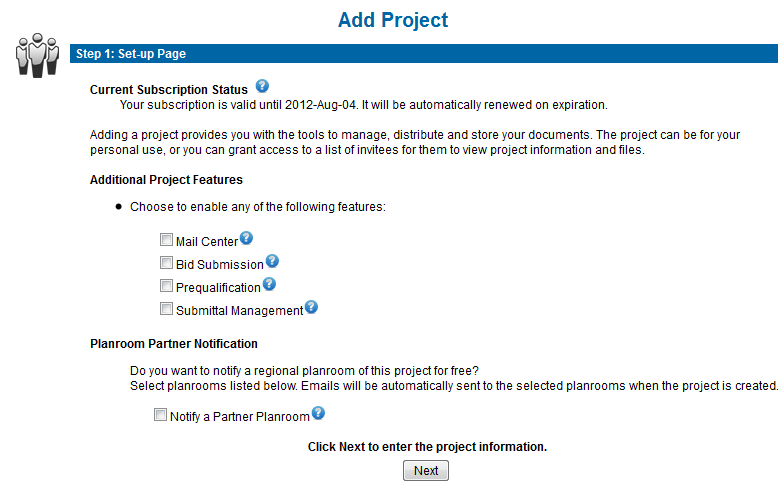
Additional Project Features
Mail Center - Import a contact list or choose project contacts from the entire directory. Messages are sent to your list via fax or email from within your project file. Automated reports track responses from those who confirm they intend to bid. Summary lists are provided to simplify the follow up process. More info
Bid Submission - The integrated online bid submission software is secure technology that streamlines the bidding process while reducing the risk of errors and non compliant bids. Automatically tabulated results are available immediately eliminating the risk of transposition errors. There are 3 customizable form options available: Supply, Trade Contractor to Prime Contractor and Prime Contractor to Owner. More info
Prequalification - A complete and secure online form is created and made available to prequalifying contacts. The instant the process is completed you receive a detailed report containing all of the required information, schedules and attachments. More info
Submittal Management - Completely organize and streamline the management, review and tracking of construction project submittals. Everyone can easily access documents to complete their review and know where others are in the process. More info
Planroom Partner Notification
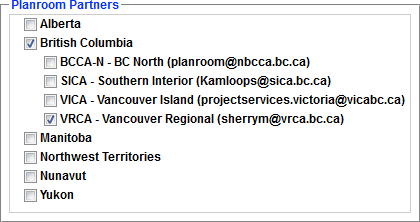
i.s. has partnered with a number of planrooms to provide the opportunity to increase the awareness of your projects. To submit your project for broader access, notify any of our participating planroom partners by placing a checkmark next to their association name. When your project is saved, an automatic email will be sent to the email address listed with a direct link into your project file for them to view and download. They may then advertise your opportunity to the subscribers of their public planroom.
Next Step: Project Details